
SquareWebsites vs Spark Plugin – Best Squarespace Plugins?
If you want a Squarespace website that stands out, customizations are the way forward! Just add them to your site to transform how it looks, functions, and feels.
In this article, we’re checking out the popular SquareWebsites and looking at how it stacks up against our very own Spark Plugin.
SquareWebsites and Spark Plugin: The drilldown
#1: Ease of use
Both platforms are relatively easy to use. Buy your customization (or customization plan in the case of Spark Plugin), grab the code snippet you’re sent, paste it into your website, and you’re good to go!
However, we’d say Spark Plugin edges this category, as you only have to add your code snippet once to get access to lots of different animations. You need to add a separate code snippet for each SquareWebsite customization you want to use.
Winner: Spark Plugin
#2: Animations
This one is fairly straightforward.
At this moment in time, SquareWebsites doesn’t offer any animated customizations. Spark Plugin offers a wide variety of animated customizations including scrolling logo carousels, loading screens, and our personal favourite, momentum scroll animations!
Winner: Spark Plugin
#3: Design features
Both tools make it easy to alter your customization to match your needs, without having to learn how to write code!
You can access all your Spark Plugin customizations through one menu, and with Square Website, you can also purchase a Chrome extension that makes it easy to import and export content and page styling between Squarespace sites. How cool is that?
Winner: It’s a draw!
#4: Customization options
Spark Plugin offers over 100 customizations for one monthly price. You can use these to change how your site looks and improve the user experience.
SquareWebsites doesn’t offer as many – 16 at last count. However, many of them are highly technical and a helpful way to make your site function better, not just for your website visitors, but for your site admin team too.
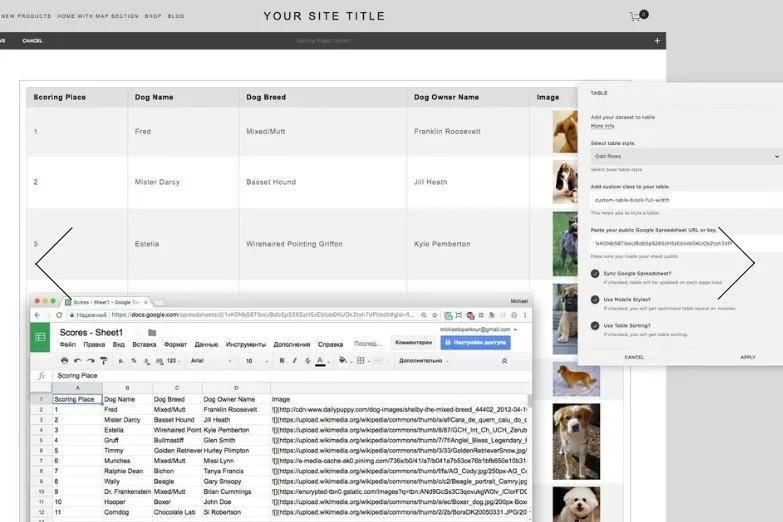
We love that there’s a customization that allows you to drop a table into your page rather than having to code it by hand.
Winner: It depends on what customizations you’re looking for!
#5: Support, reliability and performance
Both platforms offer help and support when you need it.
With Spark Plugin, help is only an email away, and SquareWebsites has its own Slack Channel where you can ask questions and talk to other users.
Each platform also has a blog with useful guidance, hints and tips.
Winner: It’s a draw!
#6: Pricing
Both platforms approach pricing in different ways.
With SquareWebsites, you pay per customization. With Spark Plugin, you pay a monthly fee, which gives you access to all the customizations in the library.
Winner: It depends on what type of pricing you prefer!
SquareWebsites vs Spark Plugin: Which is best?
Both platforms offer different customization options, with SquareWebsites leaning more towards the technical and Spark Plugin leaning towards the front-facing.
There’s definitely room for both on your Squarespace site!
We hope you enjoyed this guide to SquareWebsites. Why not check out the rest of our comparison articles?