
How to Transfer a Domain from Squarespace to Hostinger

How do you go about transferring your domain from Squarespace to Hostinger?
If you’re ready to switch your domain across, here’s how to make it as stress-free as possible!
Transfer a domain from Squarespace to Hostinger in 3 easy steps
Step 1: Get a request transfer code from Squarespace

Log in to your Squarespace dashboard. Go to the domain you want to transfer and select DOMAINS.
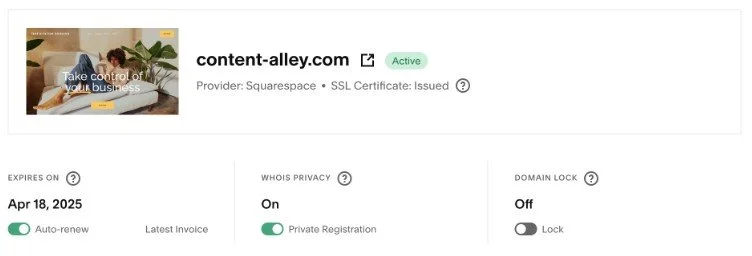
Make sure the DOMAIN LOCK toggle is off. If you can’t change it, it means you can’t transfer your domain right now—you will need to wait.
Click Request Transfer Code and reauthenticate your account if requested.
Click OK, and Squarespace will send you an email with your transfer code.
Step 2: Start the transfer on Hostinger
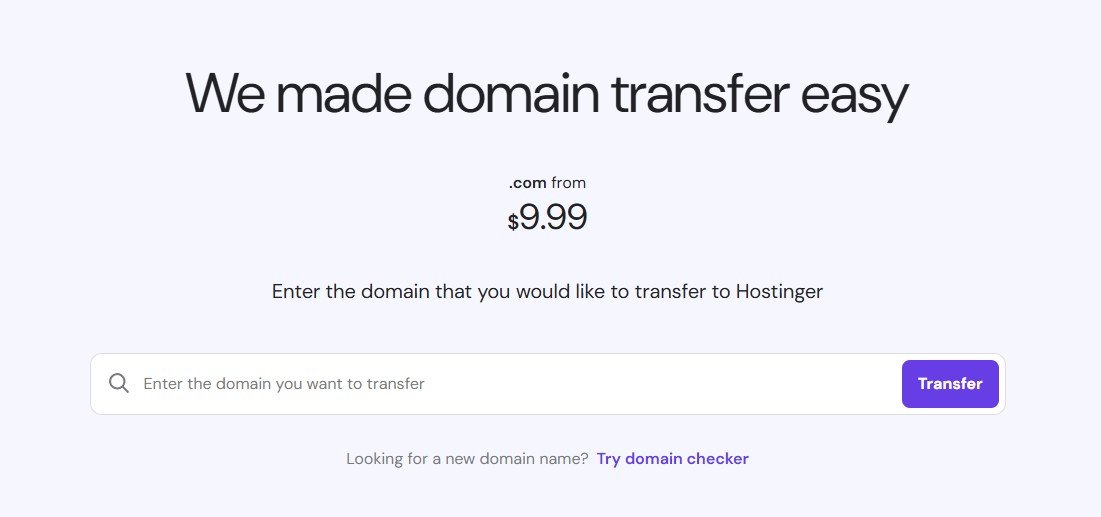
The easiest way to transfer a domain from Squarespace to Hostinger is to use its domain transfer tool. There is a small charge for this, but this includes a one-year renewal to your domain’s current expiry date.
Just enter the domain you want to transfer and follow the steps. You’ll be asked to enter the transfer code you received in step 1 as part of the process.
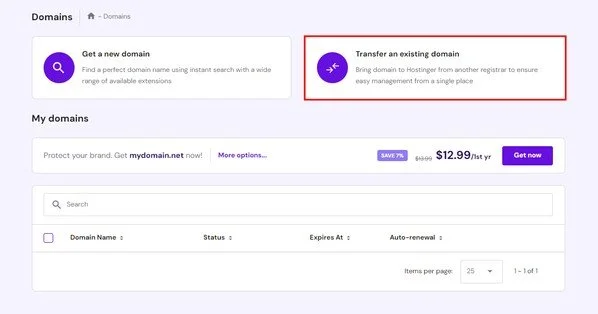
(Alternatively if you already have a Hostinger account, you can start the transfer process by logging in, choosing Domains, and selecting Transfer an existing domain.)
Step 3: Finalise the transfer
Once the transfer is complete, you’ll receive a confirmation email from Hostinger—typically between five to seven days after you started the process.
Approve, and you’ll see your domain transfer status in Hostinger move to complete… And you’re done!
Now you know how to transfer a domain from Squarespace to Hostinger!
If you’re not in a position to transfer your domain to Hostinger, you can connect it instead. Here’s a guide to setting this up.