
How to Generate a QR Code for Your Squarespace Site (Easy!)

QR codes are useful for getting people to your website quickly.
Just show them the code, let them scan it with their mobile phone… Job done!
It’s super simple to generate a QR code for your Squarespace site that you can use on posters, flyers, and product packaging.
Here’s how you can create a Squarespace QR code for a page on your site in just three minutes!
Generate a Squarespace QR code in two easy steps
Step 1: Go to the relevant page

Access the Pages panel, which is under Website in the main menu.

Hover over the page you want to add a Squarespace QR code to, and click the cog icon to open the page settings.
Step 2: Create your Squarespace QR code
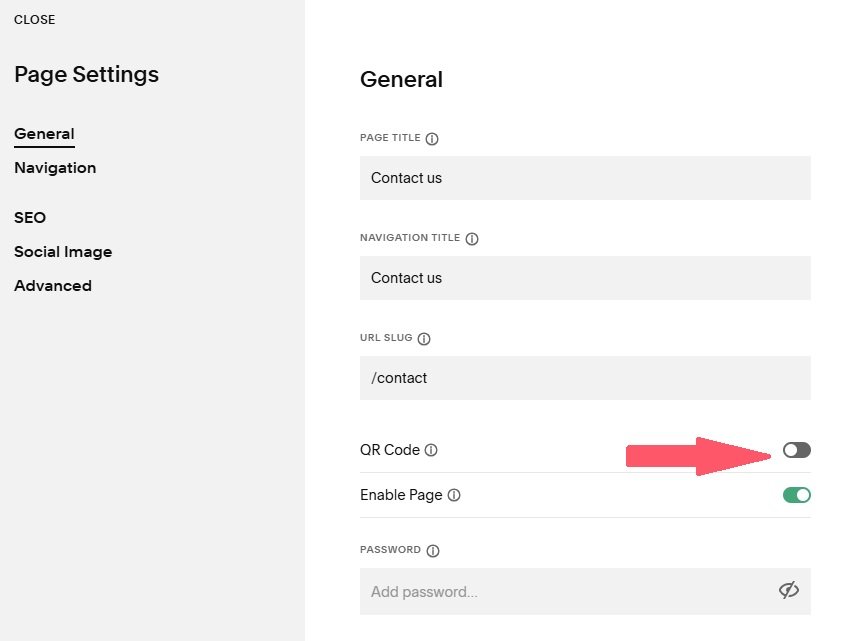
Under the General settings, toggle the QR code switch from off to on. Squarespace will automatically generate a QR code for you.
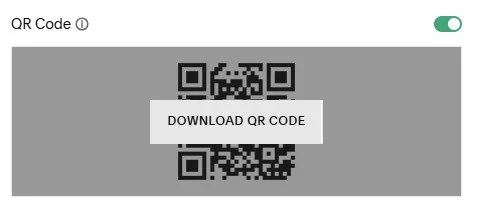
Hover over the QR code and select DOWNLOAD QR CODE to download it to your computer as a PNG file.
And that’s all there is to it!
Things to remember about QR codes in Squarespace
You can have as many QR codes for different pages of your site as you need
You can create a QR code for any page on your site apart from collection pages (for example, blog posts)
If you change the URL of your page, your QR code will no longer work. You can create a new QR code by following steps 1 and 2 again
If you’re already using your old QR code in marketing materials, you can create a redirect to reroute people to the new page link
Now you know how to create a Squarespace QR code! Why not give it a try today?