

Squarespace is a fantastic website platform, but what happens if you need to move your domain to GoDaddy?
Here’s how to transfer your domain from Squarespace to GoDaddy without the stress.
Not sure if GoDaddy is right for you? Check out our guide to GoDaddy vs Squarespace!
Transfer a domain from Squarespace to GoDaddy in 3 simple steps
Step 1: Get your transfer request code

Log in to your Squarespace dashboard. Go to the domain you want to transfer and click DOMAINS.
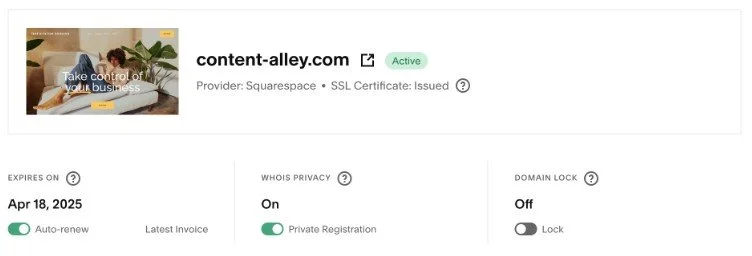
Click Request Transfer Code—you may need to reauthenticate your account when you do this.
Click OK to confirm, and Squarespace will send your transfer code to the email address associated with your account.
When you’re transferring your domain to GoDaddy, GoDaddy may refer to your transfer code as an authorization code.
Important note: Make sure the DOMAIN LOCK toggle is off. If you can’t change it, you can’t transfer your domain, or you may not have the permissions to transfer it.)
Step 2: Start the transfer on GoDaddy
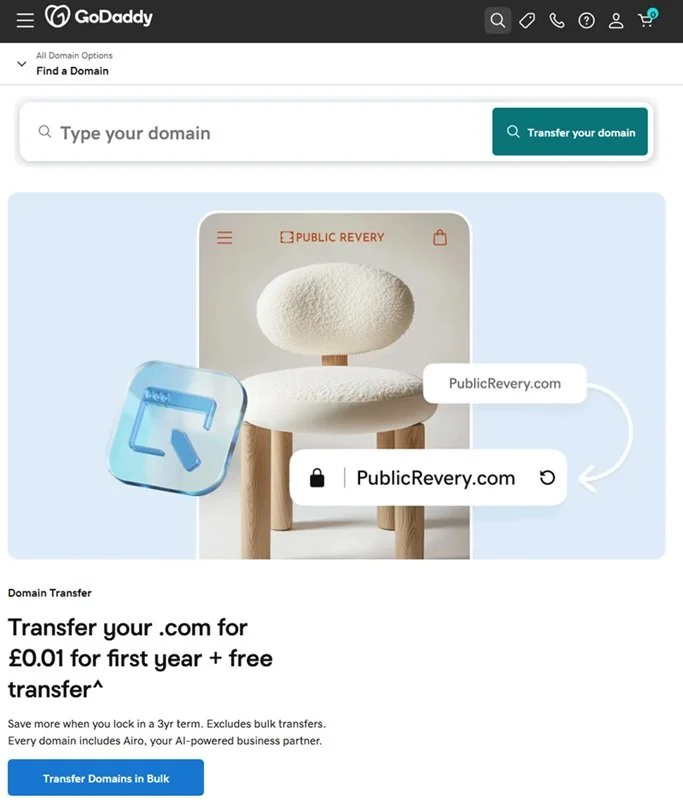
Go to the GoDaddy transfer page, search for your domain, and click Transfer your domain. You can also transfer up to 500 domains in bulk.
Enter your transfer code when prompted and choose if you want domain protection.
Then complete the checkout process.
Step 3: Finish the domain transfer
It takes between 5 to 7 days to transfer your domain from Squarespace to GoDaddy.
You can check how your transfer is progressing in your GoDaddy account, and you will receive an email if there is an issue with the transfer.
Now you know how to transfer a domain from Squarespace to GoDaddy!
If you need to transfer your domain to another provider, why not check out the rest of our guides?